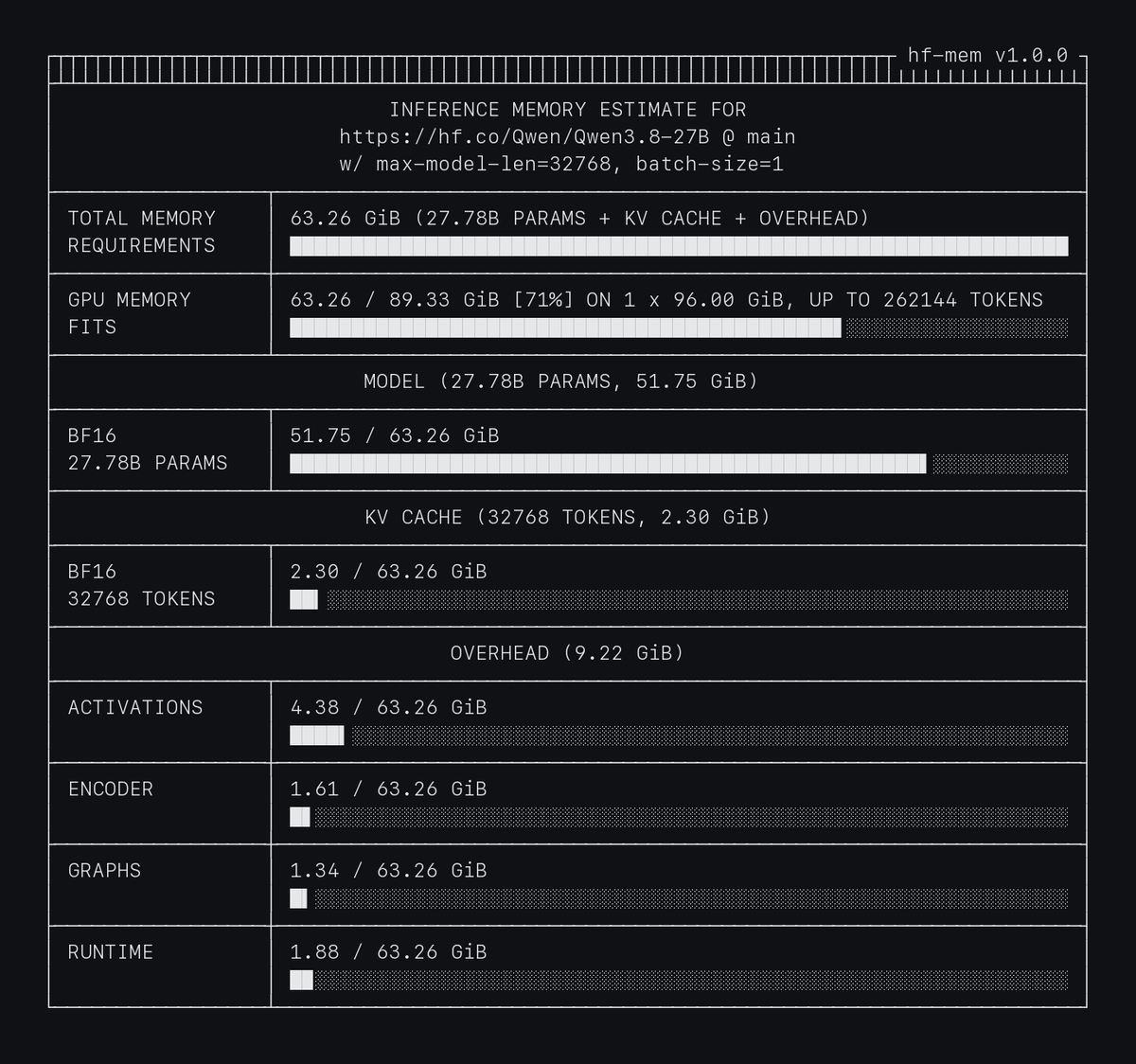
TL;DR [`hf-mem`](https://github.com/alvarobartt/hf-mem) v1.0 is out! It still estimates the memory required to run a model from the Hugging Face Hub without downloading the weights, but it now goes way beyond the weights alone: it estimates the **KV cache** and the **inference overhead** too, supports **Safetensors, GGUF and ONNX**, checks whether a model **fits on your GPU(s)**, and comes with an agent skill so that you (and your agents) can get an estimate before allocating a GPU.
This is a follow-up on [Estimate inference memory requirements w/ `hf-mem`](/hf-mem), where I introduced the first version of `hf-mem` back in January. A lot has changed since then (a rewrite of most of the estimation logic, three weight formats, and way too many GPU hours spent validating it), so this post covers what's new, how it works, and why it looks the way it looks.
{% include github_button.html repo="alvarobartt/hf-mem" %}
## Usage
As before, `uvx` is the preferred way, as it pulls the latest version from PyPI and runs it right away; and `hf-mem` still has a single direct dependency, now being [`httpx2`](https://github.com/pydantic/httpx2) (with HTTP/2 support).
```bash
uvx hf-mem Qwen/Qwen3.8-27B --max-model-len 32768 --gpu-memory 96
```
The model is now a positional argument rather than `--model-id`, and it can be a Hub model ID (optionally with `@revision`, and with `:` for GGUF as in llama.cpp), a URL, or a local path. The most relevant flags are the following:
- `--max-model-len` and `--batch-size` to set the context length and the number of concurrent sequences for the KV cache, defaulting to the context length in the `config.json` and a single sequence.
- `--kv-cache-dtype` to estimate a quantized KV cache e.g. `fp8`, defaulting to `auto` as in vLLM.
- `--gpu-memory` to check whether it fits on a given GPU (e.g. `80`) or set of GPUs (e.g. `8x80`), and the longest context that fits.
- `--file` to estimate a single file, shard set or directory (e.g. a given GGUF quantization or ONNX variant).
- `-o json` for structured output (replacing `--json-output`), and `-o markdown` to paste the estimate in a model card, an issue, or a pull request.
Private and gated models work too, reading the token from either `--hf-token`, `HF_TOKEN`, or the token saved by `hf auth login`; and models already downloaded into the Hugging Face cache are read from disk, also offline with `HF_HUB_OFFLINE=1`.
## What's New?
- **KV cache**: estimated for `--max-model-len` tokens and `--batch-size` sequences following the attention of each model: full attention caches every token, sliding window layers only the window, latent and compressed attention (e.g. DeepSeek or GLM) a smaller record per token, and linear attention or Mamba layers a fixed state per sequence.
- **Overhead**: activations of a forward pass, the vision or audio encoder for the largest input, CUDA graphs, and runtime (the CUDA context and library workspaces).
- **GGUF and ONNX**: alongside Safetensors, either listing every file in the repository or estimating a single one; for GGUF, including the `mmproj` projector of vision and audio models as llama.cpp does.
- **GPU fit**: with `--gpu-memory`, how much of the usable memory it takes (with `--gpu-memory-utilization` defaulting to 0.92 as in vLLM), how many GPUs are needed, and the longest context that fits.
- **CPU offloading**: weights that the engine keeps in CPU memory are reported apart (e.g. the token embeddings in llama.cpp).
- **Python API**: `from hf_mem import run` (and `arun` for async applications) with the same options as the CLI.
- **Agent skill** and **Hugging Face CLI extension**: more on both below.
## How It Works?
The core idea remains the same: `hf-mem` only reads the metadata of the weight files with [HTTP Range requests](https://developer.mozilla.org/en-US/docs/Web/HTTP/Guides/Range_requests), i.e. the Safetensors header, the GGUF metadata, or the ONNX graph, which contain the shape and dtype of every tensor, so the weights can be counted exactly (including packed FP4 and MXFP4 parameters, and excluding FP8 scales from the parameter counts) without ever downloading them.
On top of that, the KV cache is derived from the model `config.json` (or the GGUF metadata, or the `past_*` inputs of the ONNX graph), and the overhead from profiles fitted on vLLM for Safetensors and on llama.cpp for GGUF. So the total is the sum of three parts:
```text
total = weights + kv_cache + overhead
= Σ tensor bytes (from metadata)
+ per-token cache × max-model-len × batch-size (+ fixed state per sequence)
+ activations + encoder + graphs + runtime
```
All three are available in the JSON output in bytes, so that you can build on top of it:
```bash
uvx hf-mem Qwen/Qwen3-8B --max-model-len 32768 -o json
```
```json
{
"version": "hf-mem@1.0.0",
"model": "Qwen/Qwen3-8B",
"revision": "main",
"format": "safetensors",
"total": 27343113879,
"weights": {"bytes": 16381470720, "params": 8190735360, "dtypes": {"BF16": {"bytes": 16381470720, "params": 8190735360}}},
"kv_cache": {"bytes": 4831838208, "dtype": "BF16", "max_model_len": 32768, "batch_size": 1, "layers": {"full": 36}},
"overhead": {"bytes": 6129804951, "activations": 3371389470, "encoder": 0, "graphs": 739780853, "runtime": 2018634628},
"fit": null,
"warnings": []
}
```
## How Accurate Is It?
Estimating the weights is the easy part, but the KV cache and especially the overhead depend on how the inference engine allocates memory, so I spent quite some time validating it against vLLM 0.33, SGLang 0.5 and llama.cpp, on NVIDIA T4 to H200 GPUs, with 50+ models. The KV cache matches vLLM exactly for most architectures (within 3% for DeepSeek-V4.1, Kimi Linear and Qwen3.8-Flash-Next), and the overhead is within 10% of vLLM's on median.
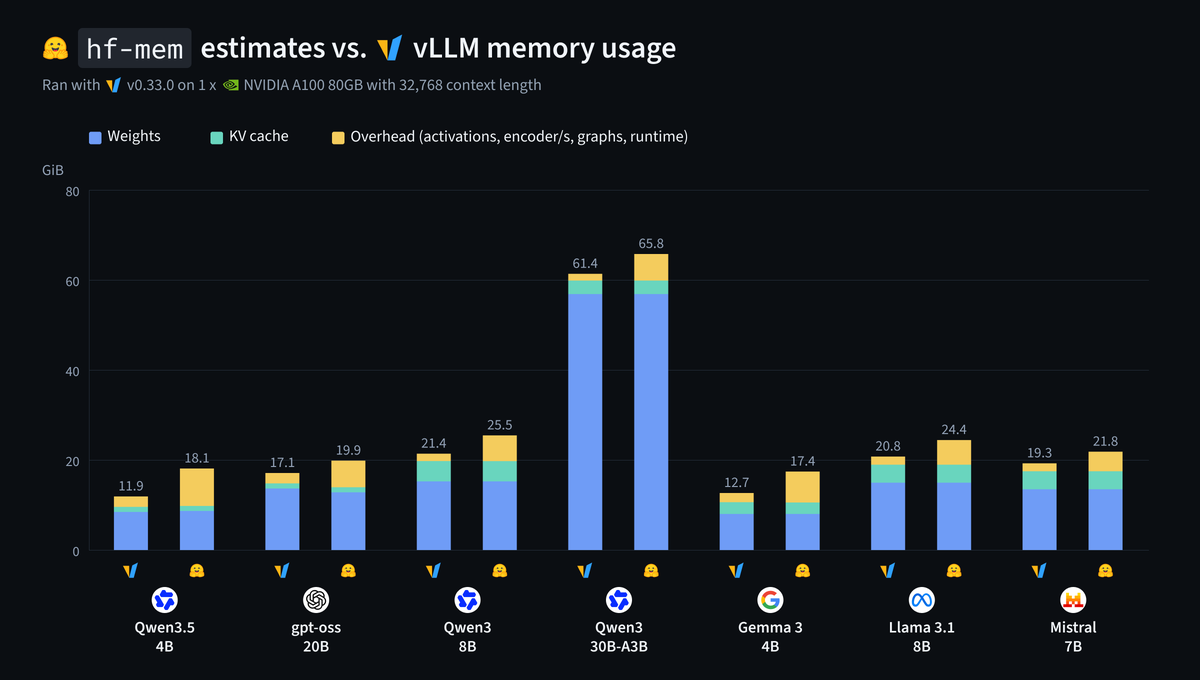
Then, to make sure it holds outside of the profiles used to fit the overhead, I ran a separate controlled comparison with pinned model revisions on a single NVIDIA A100 80GB with vLLM v0.33.0, 32,768 tokens of context and a single sequence.
Source: alvarobartt/hf-mem-validation on Hugging Face
The KV cache matches exactly across all of them, and the weights are on par too; whereas the total estimates are 7% to 52% above the sampled memory footprint, mainly coming from the overhead. That's the right side to err on, though: overestimating is way cheaper than an out-of-memory error after waiting for a GPU to be allocated and the weights to be downloaded; and still something I'd like to narrow down in upcoming releases.
I also ran the same comparison on SGLang 0.5.23, but only one out of eight requests completed (the rest timed out), so I'll just say that for `openai/gpt-oss-20b` the KV cache was 1.128 GiB estimated vs. 1.131 GiB observed, and leave it there. Note that SGLang reserves a fixed share of the GPU instead, so the total won't match anyway.
## Agents
Coding agents are probably the main consumers of `hf-mem` already, as "will this model fit on my GPU?" is a question that comes up all the time, and the answer shouldn't require downloading hundreds of GiB first. So `hf-mem` comes with an [agent skill](https://github.com/alvarobartt/hf-mem/blob/main/skills/hf-mem/SKILL.md) that explains how to use `uvx hf-mem -o json` for the GPU fit, the memory per GPU, CPU offloading, and the warnings.
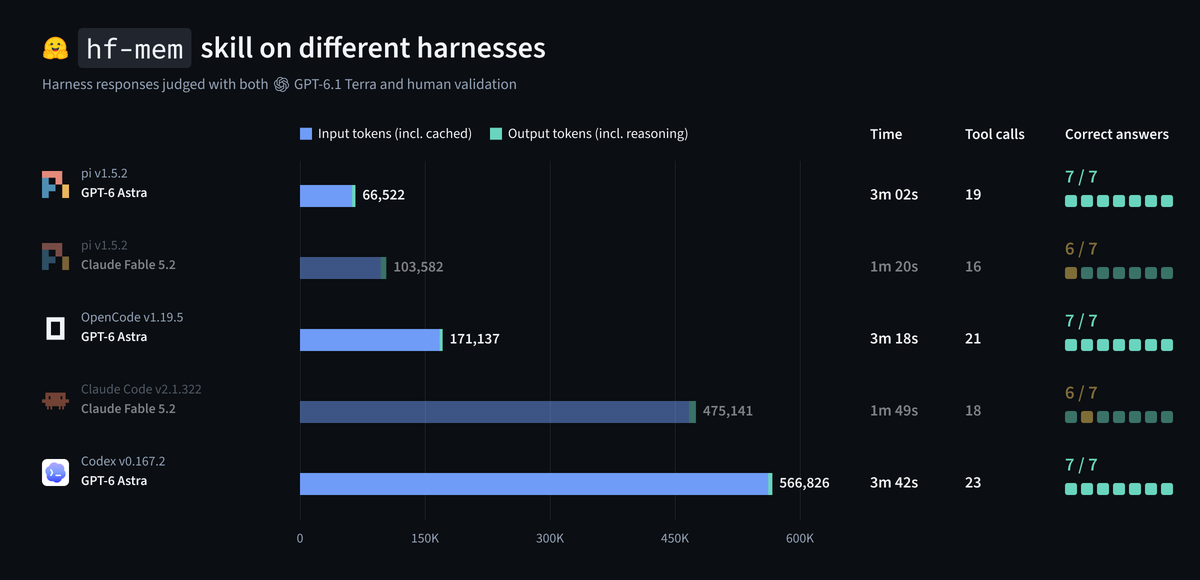
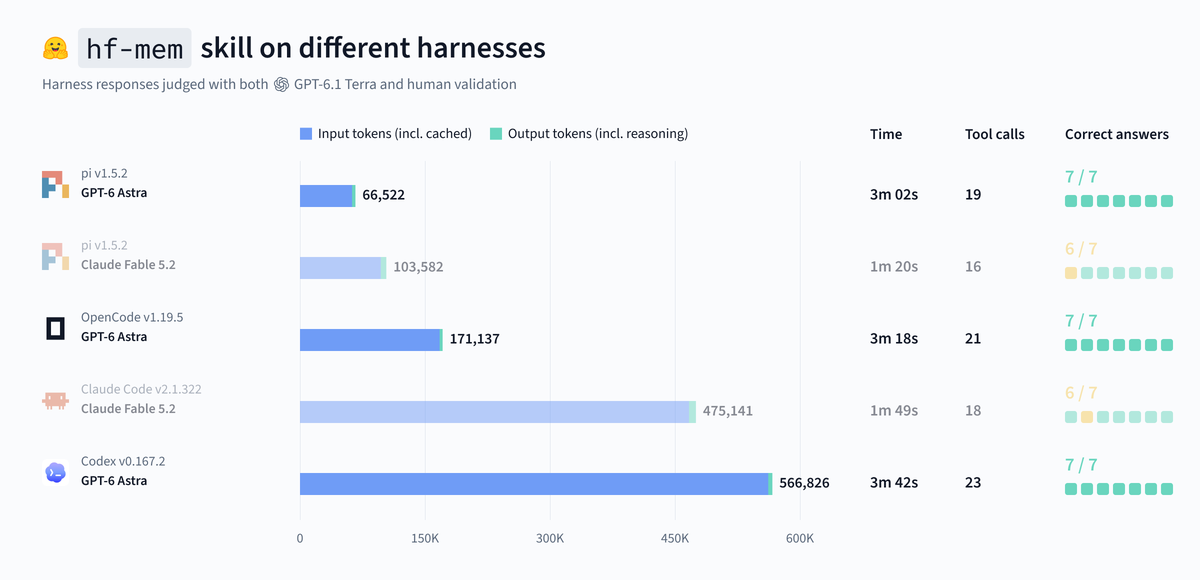
I kept the skill small on purpose, and tested the very same skill (no per-harness tweaks) on stock Pi, Codex, OpenCode and Claude Code, with seven prompts across 46 model and harness pairs, so 322 completed runs. The chart below shows the best model per provider by correct answers, across every harness it was tested on.
Source: alvarobartt/hf-mem-traces on Hugging Face
GPT-6 Astra got 7 out of 7 right in Pi, OpenCode and Codex, while reporting 66.5K, 171.1K and 566.8K tokens, respectively; and Claude Fable 5.2 got 6 out of 7 in both Pi and Claude Code. Note that the tokens are the totals reported by each harness (including cached input and reasoning), so it's not a cost comparison, but it's still interesting to see how much the harness itself matters for the very same task. All the traces are publicly available on the Hub, so feel free to dig into those!
Additionally, `hf-mem` can also be installed as an extension of the [Hugging Face CLI](https://huggingface.co/docs/huggingface_hub/en/guides/cli), so that it's available as `hf mem`:
```bash
hf extensions add alvarobartt/hf-mem
```
## Limitations
- The estimates follow vLLM and llama.cpp with their default settings, so other engines (e.g. SGLang) or non-default settings will use a different amount of memory.
- ONNX models have no overhead estimate (i.e. weights and KV cache only), and GGUF and ONNX listings estimate each file from its size, so a single file (`:` or `--file`) gives the most accurate numbers.
- PyTorch pickle weights (`.bin`, `.pt`, `.ckpt` or `.nemo`) are not supported, and encoder-decoder models (e.g. Whisper) have no KV cache estimate.
- AMD and NVIDIA Blackwell GPUs go through the same accounting in vLLM, but have not been validated yet.
## Designed With Care
For the best experience, I'd recommend [Ghostty](https://ghostty.org) with [Berkeley Mono](https://usgraphics.com/products/berkeley-mono), which is what I designed and tested the output with. Ghostty draws the box drawing and block element characters itself rather than relying on the font glyphs, so the frame lines join without gaps and the eighth-block bars line up pixel perfect, whatever the font size.
Feel free to check my dotfiles!
{% include github_button.html repo="alvarobartt/dotfiles" %}
## References
- [Safetensors Metadata parsing](https://huggingface.co/docs/safetensors/en/metadata_parsing), [GGUF File format](https://github.com/ggml-org/ggml/blob/master/docs/gguf.md) and [ONNX Intermediate Representation](https://onnx.ai/onnx/repo-docs/IR.html) for reading the metadata.
- [vLLM - Memory profiling](https://docs.vllm.ai/en/latest/configuration/conserving_memory/) for the KV cache and overhead accounting.
- [usgraphics - TR-100 Machine Report](https://github.com/usgraphics/usgc-machine-report) for the visuals, still.