You can now deploy GLM 5.2, Z.ai's latest flagship open-weight model for long-horizon work, on Microsoft Foundry Managed Compute from the Hugging Face collection and use it in Codex. That means strong coding benchmarks, agent-friendly tool use, and an OpenAI-compatible serving surface, running on dedicated AMD Instinct MI300X compute instead of sitting behind a proprietary API.
That matters more right now than it even did before. Access to frontier closed models can change for reasons that have little to do with you, such as policy, region, compliance, export controls, or provider-level availability. Anthropic's statement about a US government directive to suspend access to Fable 5 and Mythos 5 and OpenAI's limited GPT-5.6 preview at the US government's request are useful reminders that model ownership affects how you build, work, or rely on these systems, which is one of the reasons why open models are so important.
Managed Compute in Microsoft Foundry is now on public preview, giving you a way to deploy open models from the Hugging Face collection on dedicated compute without owning the whole serving stack, once your subscription has been registered for the preview. Hugging Face packages the runtime and its configuration, whereas Microsoft handles the compute provisioning, regions, authentication, networking, and such. For GLM 5.2, that means zai-org/GLM-5.2-FP8 can be deployed on 8 x AMD Instinct MI300X 192GB from the UI or the SDK without you taking care of the tricky bits yourself.
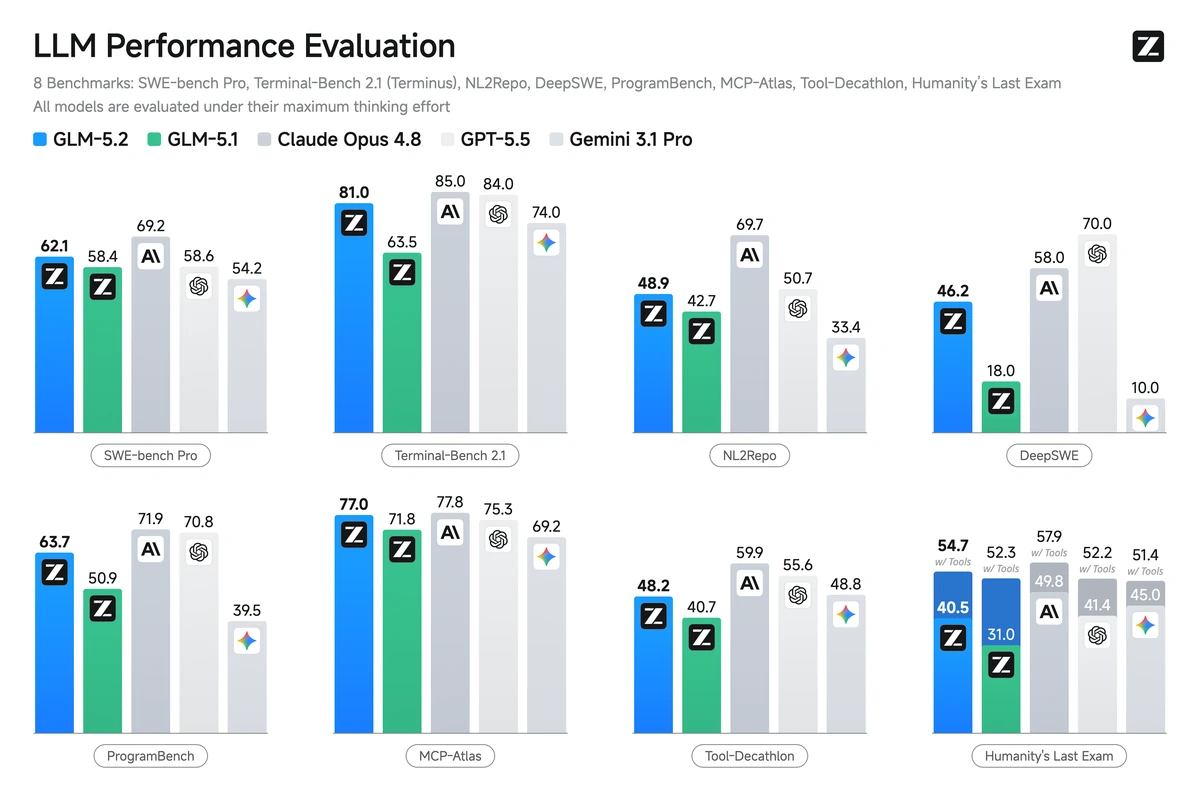
Source:
zai-org/GLM-5.2 on Hugging FaceWhat Do You Need?
- An Azure subscription with access to Microsoft Foundry
- A Microsoft Foundry resource/account
azCLI installed and be logged in withaz login- Python 3.10 or higher installed
uv pip install azure-identity azure-ai-ml "azure-mgmt-cognitiveservices>=15.0.0b2" openai
Frontier-Scale Intelligence Is A Click (Command) Away!
From Microsoft Foundry (Preview), go to Discover -> Models, filter the collection by Hugging Face, and voilà! Then you can browse all the available open-models, deploy and use those without ever leaving Microsoft Azure, as Foundry provides a chat playground, agent integrations, monitoring, etc.
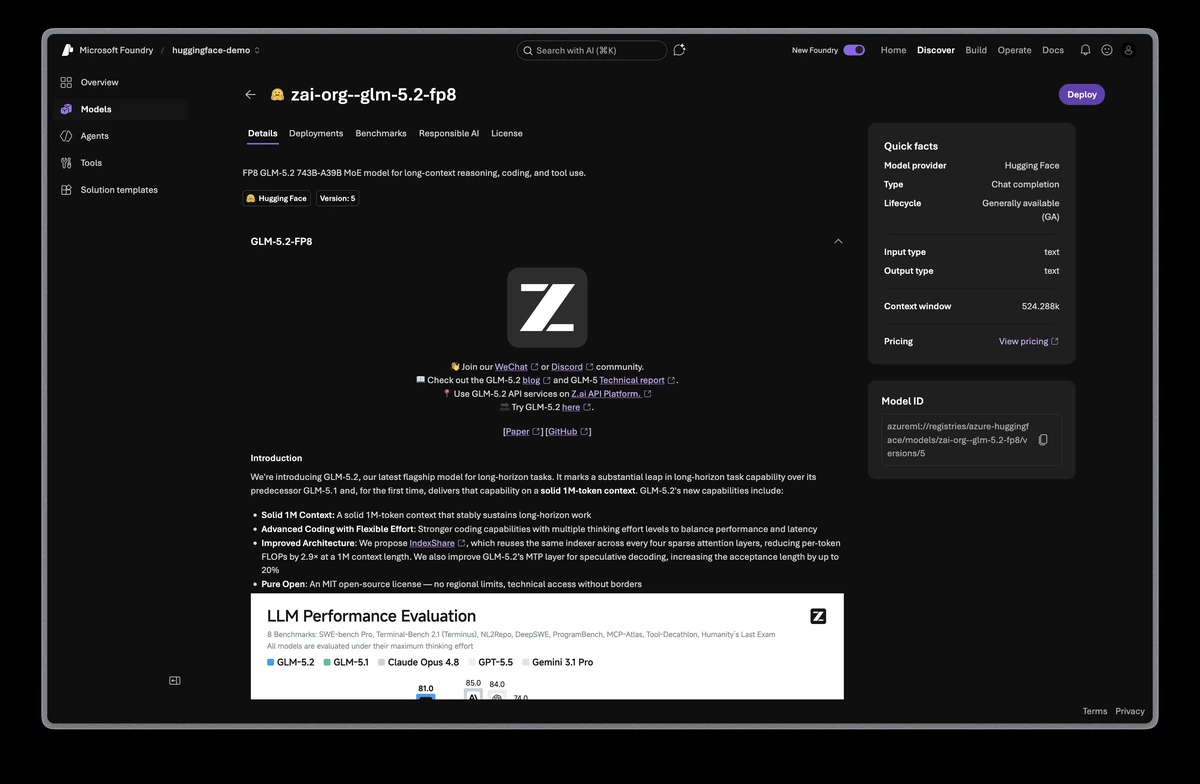
zai-org/GLM-5.2-FP8 on Microsoft FoundryAlternatively, you (or your agents) can programmatically deploy it with the Azure Python SDK as follows:
from azure.identity import DefaultAzureCredential
from azure.mgmt.cognitiveservices import CognitiveServicesManagementClient

client = CognitiveServicesManagementClient(
    credential=DefaultAzureCredential(),
    subscription_id="<SUBSCRIPTION_ID>",
)

deployment = client.managed_compute_deployments.begin_create_or_update(
    resource_group_name="<RESOURCE_GROUP>",
    account_name="<ACCOUNT_NAME>",
    # NOTE: `deployment_name` can only include alphanumeric characters, underscores
    # and hyphens, and be in between 2 to 64 characters.
    deployment_name="zai-org--glm-52-fp8",
    resource={
        "sku": {"name": "GlobalManagedCompute", "capacity": 1},
        "properties": {
            "model": "azureml://registries/azure-huggingface/models/zai-org--glm-5.2-fp8/versions/5",
            "deploymentTemplate": "azureml://registries/azure-huggingface/deploymenttemplates/zai-org--glm-52-fp8--512k-amd-8xmi300x/labels/latest",
            "acceleratorType": "MI300_192GB",
            "versionUpgradeOption": "OnceNewDefaultVersionAvailable",
        },
    },
).result()
Under the hood, it runs GLM 5.2 in FP8 with vLLM on AMD ROCm for 8 x AMD Instinct MI300X. It uses a context window of 524,288 tokens rather than the default 1,048,576 tokens so that it fits cleanly on a single node, and caps the maximum number of concurrent requests in a batch at 32. Additionally, we also tried enabling MTP with 3 to 5 heads, but saw consistency issues through the Responses API once prompts exceeded 8,192 tokens, so it's not enabled.
Note that the function call client.managed_compute_deployments.begin_create_or_update might take ~15 to 20 minutes, and it's blocking.
Once deployed, you will be able to send inference requests to it through the OpenAI-compatible API. GLM 5.2 is a reasoning model so it's better suited for the Responses API i.e., /v1/responses instead of the default Chat Completions API, /v1/chat/completions. For more information check OpenAI - Migrate to the Responses API.
from azure.identity import DefaultAzureCredential
from azure.mgmt.cognitiveservices import CognitiveServicesManagementClient
from openai import OpenAI

mgmt = CognitiveServicesManagementClient(
    credential=DefaultAzureCredential(),
    subscription_id="<SUBSCRIPTION_ID>",
)
api_key = mgmt.accounts.list_keys(
    resource_group_name="<RESOURCE_GROUP>",
    account_name="<ACCOUNT_NAME>"
).key1

client = OpenAI(
    base_url="https://<ACCOUNT_NAME>.services.ai.azure.com/openai/v1",
    api_key=api_key,
)

response = client.responses.create(
    model="zai-org--glm-52-fp8",
    input="How does Hugging Face make money?",
    reasoning={"effort":"none"},
)
print(response.choices[0].message.content)
Or with cURL as:
AZURE_OPENAI_API_KEY=$(az cognitiveservices account keys list --subscription <SUBSCRIPTION_ID> --resource-group <RESOURCE_GROUP> --name <ACCOUNT_NAME> -o tsv --query key1)

curl https://<ACCOUNT_NAME>.services.ai.azure.com/openai/v1/chat/completions \
    -H "Content-Type: application/json" \
    -H "Authorization: Bearer $AZURE_OPENAI_API_KEY" \
    -d '{"model":"zai-org--glm-52-fp8","input":"How does Hugging Face make money?","reasoning":{"effort":"none"}}'
Note that the model value in inference calls is the deployment name you created with begin_create_or_update, in this case zai-org--glm-52-fp8, not the model name in Foundry i.e., zai-org--glm-5.2-fp8 nor the Hugging Face Hub model ID i.e., zai-org/GLM-5.2-FP8.
Achieve Your Goals With GLM 5.2 In Codex
As vLLM exposes OpenAI-compatible APIs for both Chat Completions and Responses API, the integration for models running on Microsoft Foundry with Codex is as simple as defining a new profile and then attaching that profile when running Codex. Note that while the Codex configuration lives in ~/.codex/config.toml by default, in this case we will create a new profile for our GLM 5.2 deployment on Foundry, named e.g., ~/.codex/azure-huggingface.config.toml.
model = "zai-org--glm-52-fp8"
model_provider = "azure-huggingface"
model_catalog_json = "~/.codex/model-catalog/azure-huggingface.json"
model_reasoning_effort = "high"

[model_providers.azure-huggingface]
name = "Z.ai GLM 5.2 (FP8) on Foundry"
base_url = "https://<ACCOUNT_NAME>.openai.azure.com/openai/v1"
env_key = "AZURE_OPENAI_API_KEY"
wire_api = "responses"
stream_max_retries = 10

[features]
apps = false
image_generation = false

[analytics]
enabled = false
Codex also needs a local model catalog entry for context length, reasoning levels, and tool support. Create the directory first, and then save the JSON below as ~/.codex/model-catalog/azure-huggingface.json.
mkdir -p ~/.codex/model-catalog
Use this minimal catalog entry:
{
  "models": [
    {
      "slug": "zai-org--glm-52-fp8",
      "display_name": "Z.ai GLM 5.2 (FP8)",
      "context_window": 524288,
      "auto_compact_token_limit": 131072,
      "tool_output_token_limit": 16384,
      "shell_type": "shell_command",
      "visibility": "list",
      "supported_in_api": true,
      "priority": 0,
      "base_instructions": "",
      "support_verbosity": false,
      "default_reasoning_level": "high",
      "supported_reasoning_levels": [
        {
          "effort": "none",
          "description": "Reasoning disabled, for simpler queries that don't need reasoning."
        },
        {
          "effort": "high",
          "description": "Balanced depth and latency."
        },
        {
          "effort": "xhigh",
          "description": "Deepest reasoning for hard math, multi-step planning, agentic tasks. Highest token cost."
        }
      ],
      "supports_reasoning_summaries": false,
      "truncation_policy": {
        "mode": "tokens",
        "limit": 65536
      },
      "supports_parallel_tool_calls": true,
      "experimental_supported_tools": [],
      "input_modalities": [
        "text"
      ],
      "prefer_websockets": false,
      "minimal_client_version": "0.134.0"
    }
  ]
}
Before running codex, set the AZURE_OPENAI_API_KEY environment variable used by the profile above.
export AZURE_OPENAI_API_KEY=$(az cognitiveservices account keys list --subscription <SUBSCRIPTION_ID> --resource-group <RESOURCE_GROUP> --name <ACCOUNT_NAME> -o tsv --query key1)
Then run Codex with the previously created profile:
codex --profile azure-huggingface
/goal with Z.ai GLM 5.2 deployed on Microsoft Foundry.There you go, frontier-scale intelligence deployed on Foundry and running in Codex achieving goals1!
Try It Now
Go to Microsoft Foundry today, and own, deploy and scale your open-weight frontier-scale models!
Suggested Reads
-
"GLM-5.2: Built for Long-Horizon Tasks" which is the official blog post from Z.ai introducing GLM 5.2 and the comparison with earlier GLM architectures and proprietary frontier-models.
-
"GLM-5.2 is the step change for open agents", a nice write-up on the state of open-source frontier-level models compared to their proprietary counterparts, specifically around GLM 5.2 raise.
-
vLLM recipes for
zai-org/GLM-5.2and SGLang Cookbook forzai-org/GLM-5.2which contain the recipes to runzai-org/GLM-5.2on different hardware + configuration with both vLLM and SGLang, respectively. -
"Announcing Foundry Managed Compute: Run open models in Microsoft Foundry", where Foundry Managed Compute is announced, using NVIDIA Nemotron 3 Nano as an example.
-
"Using Goals in Codex", an OpenAI Cookbook guide to better understand how
/goalworks, when goals are more useful than one-off prompts, and why the intent is to give Codex an evidence-backed completion contract rather than an unbounded loop.
-
Goals are a way to give Codex a durable, thread-scoped objective instead of a single one-off instruction. A normal prompt says "do this next thing"; a goal says "keep working until this outcome is true", and lets Codex check evidence, continue from what it just learned, or stop when it reaches success, a blocker, an interruption, or a budget limit. ↩